Tag: SSL

  • What to do if your website is hacked

    What to do if your website is hacked

    Illustration of the first steps to contain, clean and secure a compromised website.

    Stay calm and act methodically

    Unexpected ads, a Google security warning, strange redirects or loss of administrator access are alarming — but panicking makes recovery harder. Breathe, gather information and follow a clear sequence: confirm the problem, preserve evidence, contain the attack, remove malicious code and then repair and harden the site.

    Quick reminder

    Don’t delete files or restore backups immediately. Early changes can destroy evidence that explains how the attacker got in — and without that you risk repeated compromises.

    The first checks: is it really a hack?

    Not every site problem is a hack. Before you commit to incident response, rule out common non‑malicious causes:

    • Domain expired or DNS misconfigured
    • Hosting outage or control panel problem
    • Expired or misconfigured SSL/TLS certificate
    • A buggy plugin or theme (especially after an automatic update)
    • Search engine warnings caused by outdated content or third‑party scripts

    Step 1 — Collect information and evidence

    Before you change anything, collect facts that will help you understand the scope of the incident and find the entry point:

    • Take screenshots of warnings, injected content and unexpected pages.
    • Check server and application logs (access logs, error logs, control panel logs).
    • Note which URLs are affected (homepage, specific pages, admin area).
    • Identify when the issue started and any recent changes (plugin installs, updates, new users, file uploads).

    Step 2 — Change all passwords and revoke sessions

    Assume credentials were exposed. Immediately change passwords for:

    • Hosting control panel (cPanel, Plesk, ISPmanager, etc.)
    • CMS administrator accounts (WordPress admins)
    • FTP/SFTP and SSH accounts
    • Database users (MySQL/PostgreSQL)
    • Any linked email accounts and third‑party integrations

    Where possible, revoke active sessions and API keys. Enable two‑factor authentication for accounts that support it.

    Step 3 — Make a full backup (preserve evidence)

    Make a complete snapshot of your site (files and database) before you delete anything. This preserves evidence for investigation and gives you a safe copy to inspect offline.

    Step 4 — Scan and inspect files and users

    Look for indicators of compromise:

    • New or recently modified files in web folders (suspicious PHP,.js,.php5,.phtml files)
    • Files with obfuscated or base64‑encoded code
    • Unknown administrator users in your CMS
    • Unexpected scheduled tasks (cron jobs) or persistent backdoors

    Step 5 — Find the entry point

    If you don’t identify how the attacker gained access, they may return.Common entry points are:

    • Outdated CMS core, plugins or themes (WordPress is a frequent target)
    • Compromised FTP/SSH or weak passwords
    • Vulnerable third‑party scripts or integrations
    • Unpatched server software or misconfigured permissions

    Step 6 — Contain and remove the malware

    Contain the damage, then remove malicious code carefully:

    1. Temporarily take the site offline or show a maintenance page if necessary.
    2. Replace infected core files with clean copies from an official source.
    3. Remove unknown plugins, themes and suspicious files — but keep your backup snapshot.
    4. Clean or rebuild modified templates and uploads; scan media folders for hidden scripts.
    5. Reset database users’ passwords and inspect tables for injected content.

    Step 7 — Restore from a known‑good backup if needed

    If the site is extensively damaged, restoring from a clean backup is often the safest route. Ensure the backup predates the compromise and that you patch the entry point before putting the restored site online.

    Step 8 — Patch, update and harden

    After recovery, close the doors the attacker used and reduce future risk:

    • Update CMS, plugins, themes and server software to the latest secure versions.
    • Harden file and folder permissions and disable unnecessary services.
    • Limit admin accounts and use strong, unique passwords plus two‑factor authentication.
    • Install a Web Application Firewall (WAF) or CDN with security features where appropriate.
    • Implement regular backups and test restores.

    Step 9 — Monitor and confirm clean operation

    After the site is live again, monitor logs, uptime and search engine warnings. Consider running malware scans for several days and verify there are no reoccurring modifications.

    When to call for professional help

    If the compromise is extensive, you cannot locate the entry point, or sensitive user data may have been exposed, get professional incident response. A security assessment can identify the root cause and recommend safe next steps.

    Need help investigating a compromise?

    Easy’s website security team can assist — they can help evaluate the incident, identify the entry point and suggest the safest way to recover. Request a Website Security Assessment.

    Conclusion

    The biggest mistake after a website compromise is restoring the site without identifying and fixing the root cause.Preserve evidence, change credentials, remove threats, then restore and harden your site. Regular updates, strong passwords, two‑factor authentication and tested backups are the best defenses against future incidents.


  • What is SSL and why does every website need it?

    Browser displaying an SSL padlock, illustrating encrypted communication between a user and a website.

    SSL Is No Longer Optional

    Just a few years ago, SSL was considered something that mainly e-commerce stores and banks needed. Today, every professional website should use HTTPS.

    The reason is simple: users, browsers and search engines now expect every website to provide a secure connection. A website without SSL looks outdated, unprofessional and less trustworthy.

    What Is an SSL Certificate?

    An SSL certificate is a digital certificate that encrypts the connection between a visitor’s browser and the web server hosting the website.

    When SSL is correctly installed, the website uses HTTPS instead of HTTP. This means the data exchanged between the browser and the server is encrypted rather than transmitted as plain, readable text.

    What Does SSL Actually Protect?

    SSL primarily protects data while it is being transmitted. This is especially important when visitors submit forms, log in, send contact information or complete online purchases.

    • Encrypts communication between the browser and the server.
    • Reduces the risk of data interception while information is in transit.
    • Helps visitors recognize that they are connected securely.
    • Essential for e-commerce stores, login pages and contact forms.
    In practice: When a visitor submits information through a form, SSL protects that data while it travels from the browser to the server.

    What Doesn’t SSL Protect?

    This is where many misconceptions begin. Many people assume that because a website displays the padlock icon, the entire website is secure. That is not true.

    SSL does not protect against:

    • A compromised WordPress installation
    • Vulnerable plugins
    • Malicious code running on the website
    • Weak administrator passwords
    • Phishing websites that also use SSL certificates
    • Incorrect permissions or poor server administration

    A malicious website can still have a valid SSL certificate. SSL only guarantees that the connection is encrypted—not that the website itself is safe or trustworthy.

    Does SSL Help with SEO?

    HTTPS is now considered a basic technical requirement for a trustworthy website. It won’t automatically push you to the top of search results, but not having HTTPS sends a negative signal to both users and search engines.

    Even more importantly, without SSL, modern browsers may display a “Not Secure” warning. That alone is often enough to damage user trust before they even read your content.

    What Types of SSL Certificates Are Available?

    DV SSL

    Domain Validation (DV) confirms that you control the domain name. It is the most common and suitable option for websites, blogs and small businesses.

    OV SSL

    Organization Validation (OV) includes additional verification of the business or organization. It is suitable for companies that want stronger business identity verification.

    EV SSL

    Extended Validation (EV) involves the highest level of organizational verification. It is mainly used in environments where identity verification and customer trust are especially important.

    What Is Mixed Content?

    Even if your website has SSL enabled, some resources may still load over HTTP. This is known as mixed content and can trigger browser warnings or weaken the perception of security.

    Mixed content usually involves images, JavaScript files, fonts or outdated URLs that have not yet been updated to HTTPS.

    SSL Installation Checklist

    ✔ Does the website load correctly over HTTPS?
    ✔ Does HTTP automatically redirect to HTTPS?
    ✔ Are there any mixed content warnings?
    ✔ Has the SSL certificate expired?
    ✔ Does it cover both the www and non-www versions?
    ✔ Are forms and login pages served only over HTTPS?
    ✔ Do the sitemap and canonical URLs use HTTPS?

    Why SSL Alone Is Not Enough

    SSL is an essential layer of security, but a secure website requires much more: an up-to-date CMS, secure plugins, a Web Application Firewall (WAF), reliable backups, strong passwords and continuous monitoring.

    Think of SSL as a locked front door protecting data while it travels. If all the windows of the house are left open, locking the front door alone won’t keep the house secure.

    Conclusion

    SSL is essential. Without it, no professional website appears complete or trustworthy.

    However, it’s important to understand what SSL does—and what it doesn’t. It secures the connection. It does not replace the overall security of your website.

    Want to check whether your SSL certificate is working correctly?

    Use Easy’s SSL Check to verify that your certificate is active, properly installed and free from common configuration issues.

    Check Your SSL
  • Why SSL Is Essential for Every Website

    Why SSL Is Essential for Every Website

    Browser address bar showing a padlock and https

    Introduction

    From a personal blog to a full e‑commerce store, security should be a basic requirement. A valid SSL certificate is the first step to show professionalism, protect visitors and strengthen your online presence. Ateasy.grwe offer official, branded SSL certificates and support to help you secure your site.

    What is SSL?

    SSL (Secure Sockets Layer) is a protocol that encrypts the connection between a visitor’s browser and your website’s server. When a site uses SSL:

    • Its address starts with https://
    • A padlock icon appears in the browser
    • All information transferred is encrypted and protected

    Why SSL matters

    Security

    SSL protects personal data, login credentials, payment details and any form of communication between users and your site. Encryption reduces the risk of eavesdropping or data tampering.

    Trust

    Visitors expect modern websites to be secure. Thehttpsprefix and padlock are quick visual cues that your site is trustworthy — especially important for contact forms, logins and transactions.

    SEO advantage

    Search engines treat HTTPS as a positive ranking signal. Using SSL can contribute to better visibility in search results, making it a small but meaningful part of your SEO strategy.

    Compliance & business requirements

    For online stores and businesses, SSL is often required to meet bank and payment processor rules and to support data-protection obligations such as GDPR. It’s not just a nicety — it’s infrastructure.

    What to look for in an SSL provider

    • Certificates from recognized providers (rooted in all major browsers)
    • Clear installation and renewal processes
    • Local language support when you need help
    • Options for different validation levels (Domain Validation, Organization Validation, Extended Validation) depending on your needs

    Quick note

    Having SSL is a simple, high-impact step you can take today to protect visitors and improve your site’s credibility. If you run a business site or accept payments, it’s effectively mandatory.

    Why choose easy.gr for SSL

    Ateasy.grwe provideofficial SSL certificates from leading vendorssuch as Sectigo, GeoTrust and RapidSSL. According to our offering:

    • Certificates are certified and recognized by all browsers
    • We offer branded SSL at the lowest prices worldwide
    • Installation and renewal are straightforward
    • Greek language support is available to guide you through every step

    Conclusion

    SSL is not just an optional feature — it is a foundational element for any serious website. It protects your users, builds trust, supports SEO and helps you meet compliance requirements. Protect your site today with an official, branded SSL certificate and the right support.

    Secure your website nowwith an official SSL certificate fromeasy.gr— supported in Greek and designed to make installation and renewal effortless.

  • Choosing the Best WordPress Hosting in Greece: A Beginner’s Guide

    Choosing the Best WordPress Hosting in Greece: A Beginner’s Guide

    Introduction

    WordPress is the most popular platform for building websites — whether you want a simple blog, an online store, or a professional business site. To run smoothly, securely and without interruptions, your site needs reliable hosting. This guide walks through the practical things to look for when choosing WordPress hosting in Greece and highlights the features easy.gr offers.

    Why specialized WordPress hosting matters

    General shared hosting can work for tiny sites, but WordPress-specific hosting adds value in four practical areas:

    1. Loading speed – visitors leave if pages are slow; hosting on SSD storage and tuned servers helps keep pages fast.
    2. Security – WordPress sites are common attack targets; a hosting provider that offers firewalls, malware protection and updates reduces risk.
    3. Easy setup – 1-click WordPress installation gets you started quickly without technical steps.
    4. Support – responsive help, ideally in your language, matters when things go wrong or when you need guidance.

    What easy.gr offers

    easy.gr brings more than 20 years of experience in the Greek market and provides a set of WordPress-focused hosting features that match the practical needs above:

    • Automatic WordPress installation for a fast start
    • Free SSL certificate to secure data in transit
    • Daily backups to protect your content and let you recover quickly
    • Support in Greek from a local team
    • Hosting on SSD storage for improved performance
    • Control-panel options: cPanel or Plesk for familiar site and server management

    Quick checklist before you choose

    • Performance: SSD storage and caching options.
    • Security: SSL, backups and malware protection.
    • Usability: 1-click installation and an intuitive control panel (cPanel or Plesk).
    • Support: availability in Greek and clear escalation paths.
    • Scalability: ability to upgrade as your traffic grows.

    Who this hosting fits

    WordPress hosting from a provider like easy.gr is suitable for a wide range of users:

    • Bloggers who want a quick, reliable setup
    • Freelancers and professionals building portfolios or service sites
    • Small e-commerce stores using WooCommerce
    • Trainers, nutritionists or consultants offering online programs

    Making the final choice

    When comparing plans, don’t focus only on price. Balance cost with the concrete features that affect your site day-to-day: performance (SSD, caching), backup frequency, SSL availability, the control panel you prefer (cPanel or Plesk), and local-language support. For many Greek businesses, having a provider with long local experience and Greek support is an important advantage.

    Conclusion

    Hosting is the foundation of any professional website. Choosing WordPress hosting that is optimized for performance, security and ease of use will save time and headaches. easy.gr offers the core features most beginners need — automatic installation, free SSL, daily backups, SSD hosting and Greek support — making it a practical option for those launching or growing a WordPress site in Greece.

    Get started todaywith WordPress hosting and build the site your business deserves. Visiteasy.grto learn more.

  • Black Friday 2022: Half‑Price Domains, Hosting and More.

    Black Friday 2022: Half‑Price Domains, Hosting and More.

    Black Friday sale — domains, hosting and SSL discounts

    Introduction

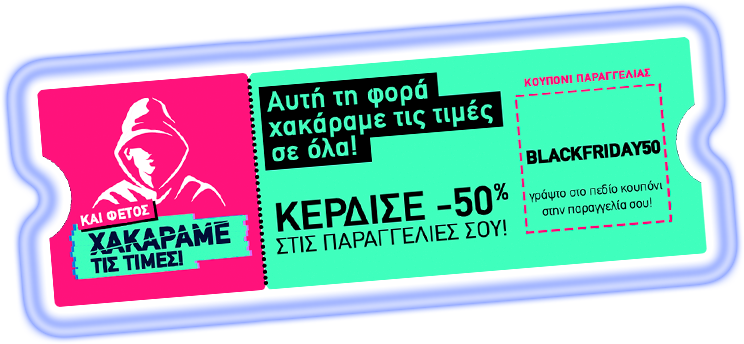
    For Black Friday 2022 Easy announced steep, site‑wide discounts: use a coupon at checkout to get 50% off a range of products including domain registrations, web hosting, SSL and antispam. The announcement included sample prices and clear restrictions on validity.

    Sample prices and discounts

    • .GR: €4.95 / διετία (from €9.90 / διετία) — “the lowest price worldwide”
    • .EU: €2.00 / διετία (from €4.00 / έτος).
    • Web Hosting: €1.11 / μήνα (from €2.22 / μήνα).
    • SSL KEY: €4.60 / έτος (from €9.20 / έτος).
    • Antispam: €2.00 / μήνα (from €4.00 / μήνα).
    • Cookiebot: €7.50 / μήνα (from €15.00 / μήνα).

    Terms and limitations

    • The listed prices do not include VAT.
    • The coupon was valid only for new purchases.
    • Validity was limited to 25.11.2022.
    • The coupon could not be combined with other promotions or coupons.

    How to claim the discount

    Enter the coupon BLACKFRIDAY50 in the coupon field at the final stage of checkout to apply the 50% reduction. The original announcement also showed sample prices labeled with BLACKFRIDAY50.GR.

    Check the website for the full list of discounted services and confirm final prices at checkout (VAT not included).

    Conclusion

    Easy’s Black Friday 2022 promotion presented a brief, significant discount across domains, hosting, security and related services. The offer included sample low prices and clear purchase restrictions: it applied to new purchases only, on 25.11.2022, and excluded VAT and coupon stacking.

  • Black Friday: Deep Discounts on Domains and Hosting

    Black Friday: Deep Discounts on Domains and Hosting

    Black Friday: Deep Discounts on Domains and Hosting — Use code BLACK2021

    Introduction

    This Black Friday Easy.gr rolled out unusually deep discounts across domains, hosting and website services. Use the coupon codeBLACK2021at checkout to unlock the promotional prices listed below. The offers span popular TLDs, managed WordPress plans, servers hosted in Greece and more.

    How to claim the offer

    Enter the coupon BLACK2021 on the checkout page to apply the discounts. Visit easy.gr to start shopping — limited availability and specific terms apply.

    What’s on offer: Domains

    Selected TLDs are heavily discounted. Prices below are the advertised promotional rates and their original prices as shown by Easy.gr:

    • .GR — €12.90 / 2‑year (from €13.00 / 2‑year) — advertised as the lowest price worldwide
    • .ME — €2.35 / year (from €23.45 / year)
    • .SITE — €2.91 / year (from €13.90 / year)
    • .PET — €6.69 / year (from €17.90 / year)
    • .SHOP — €3.78 / year (from €40.00 / year)
    • .COFFEE — €18.43 / year (from €32.90 / year)
    • .UK — €2.90 / year (from €10.47 / year)
    • .EU — €3.20 / year (from €6.90 / year)

    Hosting and infrastructure deals

    Hosting resources and related plans are offered at steep discounts. Examples published by Easy.gr include:

    • Dedicated server (hosted in Greece) — €15 / month (from €150 / month)
    • Email plans — €3.94 / month (from €4.93 / month)
    • Semi‑dedicated GR — €19.20 / month (from €24 / month)

    Website services and extras

    • Managed WordPress — €8.17 / month (from €11.67 / month)
    • Spacefiles — €2.70 / month (from €9 / month)
    • Cookiebot — €6.77 / month (from €9.67 / month)
    • SSL (Sectigo) — €6.90 / year (from €9.90 / year)

    Domain + hosting bundle bonuses

    • .GR domain free with any 2‑year webhosting package (listed saving: €16.12)
    • .SHOP domain free with any annual webhosting package (listed saving: €40)

    Quick checklist before you buy

    • Apply the coupon BLACK2021 at checkout to see the promotional prices.
    • Confirm the billing period for each offer (annual vs. multi‑year) so you understand renewal pricing and savings.
    • If you need a.GR domain free with hosting, check the 2‑year hosting requirement to claim the bonus.
    • Review included features for managed WordPress and server plans (backups, control panel, support) before committing.
    • Visit easy.gr for the full terms and to complete your purchase.

    Conclusion

    Easy.gr’s Black Friday list packs pronounced discounts across domains, hosting, and site services. If any of the listed TLDs or hosting plans match your needs, addBLACK2021at checkout to activate the advertised prices. Head over to easy.gr to review availability and full terms.

  • Spacefiles lands in Greece: secure cloud file sharing with Active Directory and 2FA

    Spacefiles lands in Greece: secure cloud file sharing with Active Directory and 2FA

    Why Spacefiles arrives at the right time

    Remote work and distributed teams are the new normal. Europlanet, in partnership with Rushfiles, is introducing Spacefiles to Greece: a cloud file‑management and co‑working platform designed to make sharing documents and collaborating with colleagues, clients and suppliers secure, simple and independent of location.

    See Spacefiles in action

    Learn more and explore the platform on our Spacefiles page: Spacefiles

    Main capabilities at a glance

    • Share files and folders with public links that can include expiration dates and password protection.
    • Collaborate with customers, suppliers and employees from anywhere — without the constraints of a physical office.
    • Access your cloud documents from PC, Mac, web and mobile devices with consistent security controls.
    • Manage file access rights and create user groups so teams can share and work together online safely.
    • Support for electronic invoicing: keep your accounting documents available online to meet invoicing needs.
    • Receive immediate notifications when files or folders change, so teams stay in sync.
    • Deep Active Directory support: multiple AD servers, mixed Domain Active Directory (Hosted AD) and Single Sign‑On using SAML / AD / LDAPS.
    • Seamless integration with Office 365 on desktops and mobile apps.

    Security and access control

    Spacefiles emphasises security features that matter for business use. The platform uses SSL for encrypted connections and supports two‑factor authentication (2FA) to add an extra layer of account protection. Combined with AD integrations and fine‑grained access rights, these features help organisations control who can view, edit or share sensitive documents.

    Who benefits most?

    Spacefiles is suitable for organisations that need secure, centrally managed file sharing and collaboration across locations. Typical beneficiaries include:

    • Companies using Active Directory who want unified identity and access management.
    • Teams that rely on Office 365 and need tight integration with cloud documents and mobile workflows.
    • Accounting and finance teams that require online access to invoices and compliance with electronic invoicing workflows.
    • Businesses that need to share files externally with expiration, password protection and audit‑friendly controls.

    Getting started

    Spacefiles is presented in Greece through the Europlanet–Rushfiles collaboration. The offering is advertised as cloud‑based, without limits or long commitments, and ready for organisations that want to centralise file management while keeping identity and security controls in place. To explore features or arrange a demo, visit the Spacefiles page linked above.

    Conclusion

    Spacefiles brings a mix of cloud convenience and enterprise identity controls to Greek organisations: public link sharing with expiry and passwords, AD and SSO support, Office 365 compatibility, notifications and security features like SSL and 2FA. For teams that must collaborate across locations while keeping document access and compliance tight, Spacefiles is positioned as a practical, secure solution.

  • Meet the New Managed Hosting: Speed, Security and Zero Compromises

    Meet the New Managed Hosting: Speed, Security and Zero Compromises

    Introduction

    Easy's new generation Managed Hosting is here. The package combines high-performance SSD storage, network-level protections and a set of free management tools aimed at reducing technical overhead for website owners. Whether you run a business site, a blog or an online store, the service bundles several features that are usually optional — and includes them at no extra cost.

    What’s included — free with every package

    • High-speed SSD disks with modern storage technology for faster page loads
    • SSL for secure connections
    • AntiDoS protections and Smart Antivirus to defend against attacks
    • Automated online incremental backup to keep recent versions of your site safe
    • Free dynamic Sitebuilder to build or update pages quickly
    • 24/7 support across all service levels
    • EasyAntispam for clean business email
    • CDN to accelerate content delivery
    • Quick and easy upgrades to scale resources when needed

    What this actually means for your website

    The combination of SSD storage and a CDN focuses on performance: lower latency, faster asset delivery and better user experience — all important for retention and search visibility. Built-in SSL and AntiDoS protections raise the security baseline, while Smart Antivirus and automated incremental backups reduce the operational risk of data loss or compromise.

    Operational benefits

    • Less time spent on maintenance — backups and basic protections are handled automatically.
    • Easier site management — the included Sitebuilder and upgrade paths make routine changes and scaling straightforward.
    • Cleaner communications — EasyAntispam helps keep business mailboxes out of spam folders.

    Who should consider it?

    This Managed Hosting is a fit for small businesses, freelancers and developers who want strong performance and security without assembling separate services. It's also useful for sites that expect traffic growth and need an upgrade path that doesn’t require migration or complex reconfiguration.

    How to get started

    All the free features and package details are listed on the product page. If you want to evaluate the service, visit the Managed Hosting page for specs and next steps.

    Explore Managed Hosting

    Learn more and compare plans at https://easy.gr/hosting/managed-hosting. If you need help choosing, support is available 24/7 to guide the selection.

    Conclusion

    Easy’s new Managed Hosting packages bring several commonly separate services together — SSD speed, CDN acceleration, security layers and automated backups — and offer them as part of a single, managed experience. For site owners who prefer to focus on content and growth rather than infrastructure, it’s a practical option worth evaluating.