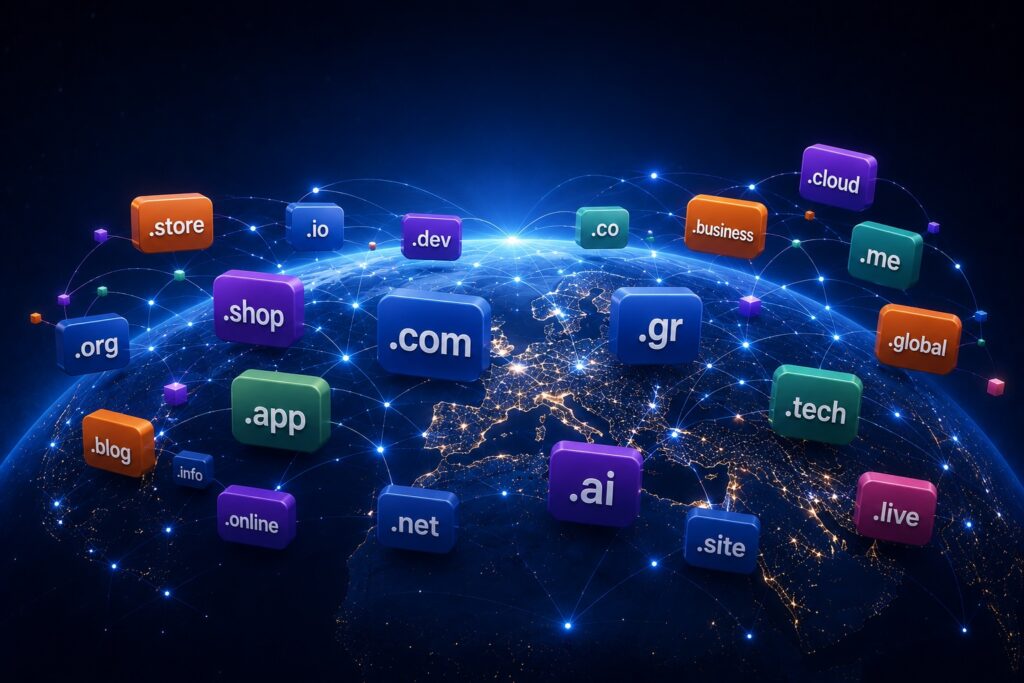
A domain extension, also known as a top-level domain or TLD, is the final part of a domain name. In easy.gr, the extension is .gr. In example.com, the extension is .com.
Common Types of Domain Extensions
Extensions help organize the domain name system and give users a quick signal about the website’s purpose, geography or identity.
How Extensions Affect Trust and Branding
The best extension is not always the most popular one. It is the one that fits your audience, your market and your long-term brand strategy.
Do Domain Extensions Affect SEO?
Generic extensions such as .com and .net are broad and international. Country-code extensions such as .gr or .de communicate geographic focus. Newer extensions such as .tech, .shop or .online can help describe a specific activity.
How to Choose the Right Extension
Search engines do not automatically rank one generic extension above another simply because of the TLD. However, country-code extensions can help communicate geographic relevance.
Common Mistakes to Avoid
Choose an extension that feels natural to your audience, supports your brand and leaves room for future growth.
Frequently Asked Questions
A domain extension, also known as a top-level domain or TLD, is the final part of a domain name. In easy.gr, the extension is .gr. In example.com, the extension is .com.
Should I treat domains as business assets?
Yes. Important domains should be protected, renewed and managed carefully.
Can Easy.gr help with domain management?
Yes. Easy.gr provides domain registration, DNS tools and support through an ICANN-accredited registrar.
Need help with your domains?
Search, register and manage your domain names through Easy.gr with the support of an ICANN-accredited registrar.
Easy.gr is an ICANN-accredited registrar and web hosting provider serving businesses, professionals and website owners since 1992.
From domain registration and DNS management to hosting, email and website security, our goal is to help businesses build and grow their online presence with confidence.
Domain names can be digital assets. Some people and companies buy domains not to build websites immediately, but to hold, develop or resell them later.
The Secondary Domain Market
A domain investor is someone who registers or buys domain names with the expectation that they may become valuable in the future.
What Makes a Domain Valuable?
When a domain is already registered, it may still be available for purchase through a marketplace, broker or direct negotiation with the owner.
Risks and Legal Issues
Domain value can be influenced by length, clarity, extension, keyword demand, brandability, market size and comparable sales.
What Businesses Should Know
Domain investing is not risk-free. Names that conflict with trademarks can create legal problems and should be avoided.
A Practical Domain Strategy
If a domain is important to your business, secure it early. Waiting can make the name more expensive or unavailable.
Frequently Asked Questions
Domain names can be digital assets. Some people and companies buy domains not to build websites immediately, but to hold, develop or resell them later.
Should I treat domains as business assets?
Yes. Important domains should be protected, renewed and managed carefully.
Can Easy.gr help with domain management?
Yes. Easy.gr provides domain registration, DNS tools and support through an ICANN-accredited registrar.
Need help with your domains?
Search, register and manage your domain names through Easy.gr with the support of an ICANN-accredited registrar.
Easy.gr is an ICANN-accredited registrar and web hosting provider serving businesses, professionals and website owners since 1992.
From domain registration and DNS management to hosting, email and website security, our goal is to help businesses build and grow their online presence with confidence.
Some domain names cost only a few euros per year. Others sell for thousands or even millions. The difference usually comes down to scarcity, memorability, commercial value and demand.
Scarcity and Demand
A premium domain is a domain name considered more valuable than a standard registration. It may be short, generic, highly brandable or commercially attractive.
Brand Value
There is only one exact version of a domain name in each extension. Once it is registered, no one else can register the same domain unless it becomes available or the owner sells it.
Keywords and Commercial Intent
A strong domain can make a brand easier to remember, easier to advertise and more credible from the first visit.
Is an Expensive Domain Worth It?
Premium domains are worth considering when they match a serious business, strengthen brand positioning or protect a name that would be difficult to replace.
Alternatives to Premium Domains
If a premium domain is too expensive, consider a different extension, a shorter brand variation or a more distinctive invented name.
Frequently Asked Questions
Some domain names cost only a few euros per year. Others sell for thousands or even millions. The difference usually comes down to scarcity, memorability, commercial value and demand.
Should I treat domains as business assets?
Yes. Important domains should be protected, renewed and managed carefully.
Can Easy.gr help with domain management?
Yes. Easy.gr provides domain registration, DNS tools and support through an ICANN-accredited registrar.
Need help with your domains?
Search, register and manage your domain names through Easy.gr with the support of an ICANN-accredited registrar.
Easy.gr is an ICANN-accredited registrar and web hosting provider serving businesses, professionals and website owners since 1992.
From domain registration and DNS management to hosting, email and website security, our goal is to help businesses build and grow their online presence with confidence.
ICANN is one of the most important organizations on the Internet, even though most users never interact with it directly.
Every time you register, renew or transfer a domain name, a global system of rules and coordination operates behind the scenes. This article explains why ICANN exists, what it does and how it affects every domain in the world.
01What it coordinates
Domain names, registrars, registries, IP addressing and essential parts of the DNS.
02What it does not do
It does not own the Internet, host websites or control online content.
03Why it matters to you
It affects registrations, transfers, policies and the stability of the domain ecosystem.
The Organization You Use Every Day Without Knowing It
Every time you type an address such as easy.gr, google.com or wikipedia.org, a mechanism that has been running continuously for decades is activated. It ensures that every domain is unique, that duplicate registrations do not exist and that your browser is directed to the correct destination.
Most users have never heard the name of the organization behind this system. Yet without it, the Internet as we know it today would be practically impossible to operate.
That organization is called ICANN. Although it affects hundreds of millions of domains and billions of users, it remains almost invisible to the general public. When you buy a domain, renew it or search for a new extension for your business, ICANN is somewhere in the background.
The Internet Before Domain Names
In the early years of the Internet, domain names as we know them today did not exist. Computers communicated with each other using numerical addresses, known as IP addresses.
Instead of typing a simple name, you would have had to remember a numerical address. While the network was small, this could work. But as more computers joined the network, the system became increasingly difficult to use.
To solve this problem, a central directory was created to map names to IP addresses. This directory was known as HOSTS.TXT. In practice, it was a file that had to be constantly updated and distributed across all systems on the network. As the Internet grew, this approach began to collapse.
The Birth of DNS
The solution came in 1983 with the creation of the Domain Name System, known as DNS. DNS works like a global phonebook. When you type a domain, DNS translates the name into an IP address so the browser can find the correct server.
Thanks to DNS, we do not need to remember numbers. We remember words. This was one of the most important developments in the history of the Internet.
But it created a new problem: who would decide who has the right to each name? Who would ensure that two different companies could not claim the same domain? Who would coordinate the entire system?
Why ICANN Was Created
During the 1990s, the Internet grew explosively. Businesses started building websites, the first online marketplaces appeared and new companies registered domains every day.
The need for a stable and globally accepted management system became urgent. In 1998, ICANN was created: the Internet Corporation for Assigned Names and Numbers.
Its mission was to manage and coordinate critical elements of the Internet’s infrastructure. Its creation did not mean that it “took control of the Internet”. It meant that a coordinating body was created so the system could continue to grow with order and consistency.
The Biggest Misunderstanding: ICANN Does Not Own the Internet
One of the most common myths is that ICANN “controls” the Internet. That is not accurate. ICANN does not own the Internet. It does not own websites, does not manage website content and does not decide what may or may not be published.
Its role is mainly coordination. It helps keep the global naming system unified and functional. Think of it more as the organization that maintains traffic rules, not the owner of the roads.
Registry and Registrar: Two Terms That Are Often Confused
To better understand ICANN’s role, you need to know two basic terms: registry and registrar.
A registry is the organization that manages a domain extension. For example, .com is managed by VeriSign, .org by the Public Interest Registry and .eu by EURid. The registry maintains the core database of all domains under that extension.
A registrar is the company through which the end user buys the domain. When you register a domain through a domain provider, you are dealing with a registrar. The registrar communicates with the relevant registry and registers the domain in your name.
What Happens When You Register a Domain
The process looks simple: you type a name, click register, pay and the domain becomes active. In reality, several things happen behind the scenes.
The user requests the registration. The registrar checks whether the domain is available. The request is sent to the relevant registry. The registry updates its database. Then DNS infrastructure is updated and the domain becomes active.
This entire process is usually completed within seconds. Behind that simplicity, however, is a global system coordinating hundreds of millions of records.
Who Decides on New Domain Extensions?
There used to be only a small number of domain extensions. The best known were .com, .net and .org. Today, there are hundreds of active extensions, such as .app, .shop, .blog, .tech, .online and .store.
Creating new extensions is not a simple commercial decision. It requires financial capacity, technical infrastructure, compliance with security rules and the ability to operate reliably over the long term.
ICANN does not simply invent new extensions. It manages the process, framework and conditions under which new extensions can be created and operated.
Why DNS Stability Is So Important
Imagine if there were two different example.com domains. Or if the same domain led to different servers depending on the country. The Internet would become chaotic.
ICANN’s greatest success may be that most users never notice it exists. The system works so smoothly that we take for granted that every domain is unique and accessible from anywhere in the world.
This stability is not accidental. It is the result of constant coordination and cooperation between many organizations, registries, registrars and technical communities.
Myths and Truths
Myth: I buy a domain and own it forever. Truth: you register the right to use it for a specific period and must renew it.
Myth: Google manages domains. Truth: Google may offer domain-related services, but it is not the authority coordinating the global naming system.
Myth: A domain and a website are the same thing. Truth: the domain is the address. The website is the content hosted behind that address.
Frequently Asked Questions
Can ICANN remove my domain?
Not directly. ICANN does not manage individual websites. However, there are policies and procedures that can affect a domain in specific cases.
Is ICANN a government organization?
No. It is a non-profit organization responsible for international coordination.
What is the difference between ICANN and a registrar?
ICANN coordinates the framework and accredits registrars. A registrar is the company through which you register your domain.
Conclusion
ICANN is not a company that owns the Internet or an organization that controls its content. It is the coordinator of a critical part of the global digital infrastructure: the naming system that allows billions of people to find websites easily and reliably.
Every time you register a domain, you unknowingly participate in an ecosystem that began decades ago and continues to evolve today. Although ICANN remains invisible to most users, its role is one of the reasons the Internet works in the way we now take for granted.
Every day we type addresses such aseasy.gr,google.comorwikipedia.organd expect a webpage to appear. That single action hides a fast sequence of systems working together: DNS, routers, nameservers, hosting servers and security checks.
The journey at a glance
You type the domain (for example easy.gr).
DNS lookup starts and the browser asks a resolver for the address.
Nameservers provide the domain's DNS records and the IP address is returned.
Your browser connects to the hosting server at that IP.
HTTPS/SSL checks run to verify the connection is secure.
The server sends the website files and the browser builds the page.
1. The browser starts the journey
You open your browser, typeeasy.grand press Enter. At that moment the browser only knows the human-friendly name — not where the website actually lives, which machine will answer or which country hosts the infrastructure.
To get to the website, the browser must translate the domain into a machine-friendly address: an IP address.
2. Computers do not speak in names
People remember names. Machines use numerical addresses calledIP addresses. An address may look like185.123.45.67or a longer IPv6 string. The domain name is for humans; the IP address is for machines.
3. DNS enters the picture
The Domain Name System (DNS) is the global directory that maps a domain name to an IP address. In simple terms:
easy.gr → 185.xxx.xxx.xxx
Without DNS we would have to remember long numbers instead of readable names — the Internet would be much harder to use.
4. The question travels from server to server
If your device does not already have the answer cached, a chain of queries begins. The browser asks the local DNS resolver; if that resolver has no cached value it will query higher-level servers. Root servers point resolvers to the right top-level domain (for example.gr), those point to the registry, and finally the domain's nameservers hold the DNS records that contain the actual IP.
Small detail, big impactIn practice, much of this process is often answered from cache. This means that if the information was requested recently, DNS can respond much faster.
5. the nameservers return the answer
Nameservers store the DNS settings for a domain: which server hosts the website, which mail servers handle email, and other records. For visiting a site the important record is the one that maps the domain to the web server's IP address. When the nameservers return that IP, the browser knows where to connect.
6. the browser connects to the hosting server
Using the IP address the browser opens a connection to the web server that hosts the site. This is the point where hosting and domain meet: the domain points to an address, the hosting at that address stores and serves the actual content.
If hosting is misconfigured or unreachable, the browser may reach the IP but receive no useful response — which is why domains and hosting are separate but interdependent.
7. the HTTPS security check takes place
Most websites use HTTPS. Before exchanging data the browser and server negotiate SSL/TLS: the browser verifies that the server's certificate is valid, matches the domain and allows an encrypted connection. If the certificate is OK, the padlock appears and the session continues encrypted. If not, the browser shows a security warning.
8. the server sends the website
The browser requests the page and the server responds with the files needed to assemble it: HTML, CSS, JavaScript, images, fonts and other assets. Modern sites can require dozens or hundreds of separate files; the browser receives pieces and assembles them rather than a single rendered image.
9. the page appears on your screen
After downloading assets the browser parses the HTML, applies styles, executes scripts, loads images and places elements in the right positions. What looks like an instant load is actually dozens of coordinated steps — usually completed in less than a second.
Why this matters
Knowing this flow explains common problems: a DNS misconfiguration can make a domain unreachable; hosting issues can leave the server silent even if the IP is correct; an expired SSL certificate triggers browser warnings. Each layer — DNS, nameservers, hosting, SSL — plays a specific role, and failure in any layer can break the experience.
What have you learned?
A simple press of Enter triggers a global collaboration of systems. You now know why DNS exists, what nameservers do, why hosting matters, how HTTPS protects connections and how browsers find and build websites. The Internet is not a magical cloud but a complex, distributed system that turns readable names likeeasy.grinto working webpages.