Author: Δημήτρης Σαμαράς

  • Should You Register Multiple Domain Extensions?

    Illustration of multiple domain extensions such as .gr, .com and .eu connected to one brand name

    Do You Only Need a .gr Domain, or Should You Register Other Extensions?

    One of the most common questions after choosing a domain name is:

    Should I register only the .gr version, or should I secure additional extensions as well?

    The answer depends on how important your brand name is to your business.

    For some businesses, a single domain is enough. For others, registering multiple extensions can protect the brand and prevent expensive problems in the future.

    What Does “Multiple Domain Extensions” Mean?

    Let’s assume your business is called mybrand.

    The following domains may all be available:

    mybrand.gr
    mybrand.com
    mybrand.eu
    mybrand.online
    mybrand.shop

    They all share the same name, but each has a different extension.

    The real question isn’t whether you can buy them all. The better question is:

    Which extensions actually add value to your brand?

    When Is One Extension Enough?

    If you run a small local business, operate exclusively in Greece, and only need a basic online presence, a single extension is often enough.

    For example:

    mybrand.gr

    There is little value in registering dozens of extensions without a clear strategy.

    Your domain portfolio should support your business strategy—not grow randomly simply because an extension happens to be on sale.

    When Is It Worth Registering the .com?

    If your business name is important to you, the .com is usually the first additional extension worth protecting.

    For example:

    mybrand.gr
    mybrand.com

    By doing so, you:

    • protect your brand name
    • reduce customer confusion
    • keep the door open for international expansion
    • lower the risk of someone else using your brand globally
    The .com remains the world’s most recognized domain extension.

    What Happens If You Don’t?

    Imagine you’ve been operating for years using:

    mybrand.gr

    Then one day you discover that:

    mybrand.com

    belongs to someone else.

    This can lead to issues such as:

    • lost visitors
    • misdirected emails
    • customer confusion
    • difficult international expansion
    • having to buy the domain back at a much higher price
    The best time to protect a domain is before someone else needs it.

    Do I Need the .eu Extension?

    The .eu extension makes sense if you want to present your brand as having a European identity.

    It can be useful if:

    • you serve customers across multiple European countries
    • you have European partners or clients
    • you want to showcase a broader European presence

    For businesses focused solely on Greece, it isn’t always necessary. For companies thinking internationally within Europe, it can be a valuable addition.

    What About the New Domain Extensions?

    In recent years, hundreds of new domain extensions have become available, including:

    .shop
    .store
    .online
    .tech
    .digital
    .cloud

    Some of them can be an excellent fit for specific businesses.

    For example, an online store may benefit from .shop, while a technology company may find .tech particularly relevant.

    However, these extensions usually work best as complementary domains—not as replacements for your primary .gr or .com.

    How Do You Manage Multiple Domains Efficiently?

    As your brand grows, managing multiple domains can become increasingly complex.

    For example:

    mybrand.gr
    mybrand.com
    mybrand.eu
    mybrand.shop

    Rather than treating them as separate domains, it is more practical to manage them as a single domain family.

    As your brand grows, organized domain management becomes increasingly important.

    This makes it much easier to see which domains you own, which ones are expiring, which are actively used, and which exist purely to protect your brand.

    A Practical Example

    A business operating only in Greece might start with:

    mybrand.gr

    As it expands, it may register:

    mybrand.com
    mybrand.eu

    And if it launches an online store or a dedicated campaign, it may also register:

    mybrand.shop

    Not every domain has to be actively used. Many simply exist to protect the brand.

    Common Mistakes

    Registering dozens of extensions without a strategy

    Many businesses buy multiple TLDs without knowing why. In most cases, this adds little real value.

    Ignoring the .com version

    If your brand matters, losing the .com may create significant challenges later.

    Buying domains simply because they’re cheap

    Every domain should serve a purpose—not just take advantage of a temporary promotion.

    Not tracking renewal dates

    The more domains you own, the more important it becomes to know when they expire and which ones are critical for your business.

    A Practical Strategy

    For most businesses, a simple approach works best:

    Minimum: .gr
    Recommended: .gr + .com
    Optional: .eu or a niche extension related to your industry

    This provides a healthy balance between brand protection, flexibility, and cost.

    Conclusion

    You don’t need to register every extension available.

    But if your brand is valuable, protecting your name is usually worth far more than the modest cost of an additional registration.

    For most businesses, the combination of .gr and .com offers the best balance between protection and flexibility.

    The smartest strategy isn’t to buy everything—it’s to secure the domains that truly protect your online identity.

    Want to check which extensions are available?

    Use the Easy AI Domain Finder to search dozens of domain extensions at the same time.

    Try the AI Domain Finder →


  • What Is a Domain Registrar?

    Illustration of a domain registrar managing domain registrations and communicating with the official domain registry.

    You Registered a Domain. But Who Actually Manages It?

    Registering a domain name feels like a simple process. You search for an available name, add it to your cart, complete the payment and, within minutes, the domain appears in your account.

    Behind this straightforward experience, however, is a well-structured ecosystem involving ICANN, registries, registrars and, ultimately, the domain owner.

    A Domain Registrar is the link between the end user and the global domain registration system. It is much more than an online store selling domain names. It is the organisation through which you register, renew, transfer and manage your domain name.

    The Domain Ecosystem at a Glance

    ICANN sets the rules
    Registry manages the extension
    Registrar serves the customer
    Owner owns the domain

    What Is a Domain Registrar?

    A Domain Registrar is the company through which you register and manage a domain name.

    If you want to register a domain such as example.gr or example.com, you do not buy it directly from ICANN. Instead, you normally register it through an accredited registrar.

    The registrar checks whether the domain is available, submits the registration request to the appropriate registry and provides the tools you need to manage your domain.

    What’s the Difference Between a Registry and a Registrar?

    This is where most people get confused.

    A Registry is the organisation or infrastructure responsible for managing an entire domain extension, such as .gr, .com or .eu.

    A Registrar is the company that works with the registry and allows you to register and manage individual domain names within that extension.

    ICANN → Registry → Registrar → Domain Owner

    Simply put, the registry manages the extension, while the registrar serves the customer.

    What Does a Registrar Do?

    A registrar’s role extends far beyond the initial registration.

    Typically, a registrar provides services such as:

    • registering new domain names,
    • renewing existing domains,
    • transferring domains from another registrar,
    • changing nameservers,
    • basic DNS management,
    • updating domain ownership details,
    • locking domains to prevent unauthorised transfers.

    For most users, the registrar is the primary point of contact for everything related to their domain.

    What Doesn’t a Registrar Necessarily Do?

    This distinction is important.

    A registrar is not necessarily your hosting provider. It does not automatically host your website, provide your email service or act as the registry itself.

    You can easily have:

    • your domain registered with one registrar,
    • your website hosted by another company,
    • your email managed by a third-party provider,
    • your DNS handled by a specialised DNS service.

    The domain is your online name. Hosting stores your website. Email is a separate service. A registrar primarily manages the domain itself and its essential configuration.

    What Does “ICANN Accredited Registrar” Mean?

    For many international domain extensions, a registrar can become an ICANN Accredited Registrar.

    This means the company has successfully completed ICANN’s accreditation process and operates according to the rules and obligations established for the global domain name system.

    It does not mean that every reliable registrar must be ICANN accredited for all services, nor does it mean that ICANN sells domain names directly. It simply means that, for specific global extensions, the registrar has an official relationship with the international domain name ecosystem.

    Did you know? Many people believe they buy domains directly from ICANN. In reality, ICANN does not sell domain names. Its role is to regulate the framework within which registries and registrars operate.

    How Do You Choose the Right Registrar?

    Choosing a registrar is about much more than finding the lowest price.

    A reliable registrar should offer intuitive management tools, responsive support and complete transparency regarding renewals and transfers.

    Before making your choice, consider whether:

    • renewal pricing is clearly explained,
    • DNS and nameserver management is easily accessible,
    • domain locking and essential security features are available,
    • the support team has genuine domain expertise,
    • transfer and management procedures are simple and transparent.

    For many businesses, a domain name is their most valuable digital asset. It deserves to be managed through a platform you trust.

    Why Does Your Registrar Matter?

    If everything works as expected, you probably never think about your registrar.

    But when you need to change nameservers, transfer a domain, update ownership details, renew it on time or resolve a technical issue, your registrar becomes critically important.

    A good registrar is not simply the company that sells you a domain name. It is the company that helps keep your domain secure, active and properly connected to your website, email and online services.

    What Have You Learned?

    A Domain Registrar is the company through which you register and manage your domain name.

    You now understand the differences between ICANN, registries and registrars, what a registrar does, what it does not necessarily do, and why choosing the right registrar has a direct impact on the security and continuity of your online presence.

    Most importantly, remember this: your domain name is much more than a web address. It is the identity of your business on the Internet, and your registrar is the key organisation responsible for helping you manage and protect that identity.

  • What is the DNS;

    Visual guide to DNS records, domain settings and how websites connect to the internet

    DNS: The Translation Layer You Never Notice

    If you’ve already read our article about what happens when you type a domain name into your browser, you may remember that one of the very first steps is a DNS lookup.

    It is a process that happens billions of times every day, yet most users never even notice it. You type a name, press Enter and the website appears.

    Without DNS, however, the Internet as we know it simply could not exist. It would be full of numbers, difficult addresses and information that no one could realistically remember.

    DNS at a Glance

    easy.gr the name you remember
    DNS Query the lookup begins
    Nameservers the answer is found
    IP Address the address is returned
    Website the browser connects

    What Is DNS?

    DNS stands for Domain Name System.

    It is a global system that translates website names into IP addresses. In simple terms:

    easy.gr → 185.xxx.xxx.xxx

    People remember words. Computers communicate using numbers. DNS is the translator that connects these two worlds.

    Why Do We Need DNS?

    Imagine a world without DNS. Instead of typing easy.gr, you would have to remember a numerical IP address for every website you visit.

    Every website, every application, every email service and every online platform would require a long sequence of numbers. In practice, the Internet would be almost impossible for everyday users.

    DNS makes the Internet human-friendly by allowing us to use names instead of numbers.

    How Does DNS Work?

    Suppose you type easy.gr into your browser. The browser does not automatically know where that website is located, so it begins a lookup process.

    The journey looks something like this:

    easy.gr → DNS Resolver → Root Servers → .gr Registry → Nameservers → IP Address → Website

    Within just a few milliseconds, the correct IP address is returned and the browser connects to the server hosting the website.

    A Small Detail That Makes a Big Difference
    In practice, many DNS responses are temporarily stored in cache. If the same lookup has been performed recently, the answer can be returned almost instantly without repeating the entire process.

    What Is a DNS Resolver?

    A DNS Resolver is the first server your computer asks when it needs to find the IP address of a domain.

    It is usually provided by your Internet Service Provider (ISP), although many users choose public services such as Google Public DNS or Cloudflare DNS.

    If the resolver already knows the answer, it responds immediately. Otherwise, it performs the complete lookup process until it reaches the authoritative nameservers.

    What Are Nameservers?

    Nameservers are the servers that store the authoritative DNS information for a domain.

    They contain the DNS records that define where the website is hosted, where emails should be delivered and which online services are connected to the domain.

    In other words, nameservers are the single source of truth for your domain.

    What Are DNS Records?

    DNS records are the individual pieces of information stored on the nameservers.

    A Record

    Connects a domain name to an IPv4 address.

    easy.gr → 185.xxx.xxx.xxx

    MX Record

    Specifies where emails for a domain should be delivered.

    CNAME Record

    Creates an alias. For example, www.easy.gr can point to easy.gr.

    TXT Record

    Commonly used for SPF, DKIM, DMARC and domain ownership verification.

    What Happens If DNS Stops Working?

    This is one of the most common—and most misunderstood—Internet issues.

    Your website may be running perfectly. Your hosting server may be online. But if DNS fails, users simply cannot find the correct destination.

    Website: Online · Server: Online · DNS: Offline

    It’s like having a house with no street signs pointing the way.

    DNS and Website Speed

    DNS affects website loading speed more than many people realize.

    If a DNS lookup is slow, the browser’s first connection to the website is delayed as well. That’s why modern websites rely on fast, reliable and globally distributed DNS networks.

    DNS is not the only factor that determines website performance, but it is one of the very first steps in every page request.

    DNS and Security

    DNS is not only about speed—it is also a critical part of Internet security.

    Technologies such as DNSSEC help protect against forged DNS responses and attacks that attempt to redirect users to fake or malicious websites.

    Simply put, DNS should not only answer quickly—it must also answer correctly.

    Did you know? Every website you visit, every app you open and every email you send relies on some form of DNS lookup.

    What Have You Learned?

    DNS is one of the fundamental building blocks of the Internet.

    You have learned what DNS is, why it exists, how it finds an IP address, what nameservers do, what DNS records are and why DNS plays an important role in both website performance and online security.

    Most importantly, you’ve seen that without DNS, the Internet would simply be a massive collection of numerical IP addresses that nobody could realistically remember.

  • .gr or .com

    Comparison between .gr and .com domains for choosing the right business extension

    Which Domain Extension Really Fits Your Business?

    Most business owners spend hours trying to find the right name for their website.

    Far fewer spend enough time choosing the right domain extension.

    And yet, the choice between .gr and .com affects how users perceive your business, the trust your brand creates and the opportunities it may have for future growth.

    There is no single right answer for everyone. But there is a right answer for your specific case.

    What Does .gr Mean?

    .gr is the national domain extension of Greece.

    When visitors see a domain ending in .gr, they immediately understand that the business is mainly focused on the Greek market.

    .gr is an ideal fit for:

    • Greek online stores
    • local businesses
    • professionals operating in Greece
    • companies serving mainly Greek-speaking audiences

    For a Greek user, a .gr domain often creates a stronger sense of familiarity.

    What Does .com Mean?

    .com is the most widely recognized domain extension in the world.

    For decades, it has been the default standard of the international internet.

    If a business:

    • operates in multiple countries
    • has customers outside Greece
    • plans international expansion
    • builds SaaS products or online services

    then .com is usually the more natural choice.

    Which One Creates More Trust?

    This is probably the most common question.

    The answer is:

    It depends on your audience.

    For a Greek consumer, a domain such as bestinsurance.gr often feels more familiar than bestinsurance.com.

    For an international customer, however, the opposite is usually true.

    There is no universally better extension. There is only the extension that fits the audience you want to reach.

    What About SEO?

    One of the most common myths is that .gr automatically ranks higher in Google, or that .com is better for SEO.

    In reality, Google does not rank a website higher simply because of its domain extension.

    Much more important factors include:

    • content quality
    • speed
    • website quality
    • backlinks
    • user experience

    However, a .gr domain can help Google understand more clearly that the website is mainly intended for the Greek market.

    A Practical Example

    If you register a domain such as taxadvice.gr and your business is focused exclusively on the Greek market, then .gr is the logical choice.

    However, if your service is aimed at customers in multiple countries, a domain such as taxadvice.com is usually the better option.

    Your domain extension is not just a cosmetic detail. It is part of your brand positioning strategy.

    When Is It Worth Registering Both?

    In many situations, registering both extensions is the smartest long-term decision.

    For example:

    mybrand.gr
    mybrand.com

    By doing so, you:

    • protect your brand identity
    • prevent others from registering a similar name
    • reduce customer confusion
    • keep the door open for future expansion

    Quick Checklist

    If most of the following statements apply to your business, you should seriously consider registering both the .gr and .com versions of your domain.

    ✔ Your business name is an important brand asset.
    ✔ You invest in advertising and marketing.
    ✔ You are building a long-term brand.
    ✔ You already have—or plan to launch—a website.
    ✔ You want to protect your brand from confusion and copycats.

    The Most Common Mistakes

    Choosing an Extension Only Because It’s Cheaper

    Your choice should be driven by business strategy—not by saving just a few euros.

    Choosing a Domain Name That Is Too Long

    The harder your domain is to remember, the less valuable it becomes as a brand.

    Using Hyphens Without a Good Reason

    Domains with multiple hyphens are harder to communicate, easier to mistype and often look less professional.

    Registering Only One Extension

    When your brand has real commercial value, relying on a single extension may create unnecessary problems in the future.

    Conclusion

    The choice between .gr and .com is not about trends.

    It is about business goals.

    If your business primarily serves the Greek market, a .gr domain is usually the most natural choice. If your ambitions are international, .com is often the right place to start.

    And if your business name is an important asset, registering both extensions is often the safest and smartest long-term strategy.

    Ready to Find the Right Domain?

    Use Easy’s AI Domain Finder to discover available domain names and choose the extension that best fits your business.

    Try the AI Domain Finder →
  • How to Choose the Right Domain Name


    Choosing the right domain name for your business or website

    Why Your Domain Name Matters More Than You Think

    When someone starts a new business, an online store or a personal project, they often spend a lot of time on the logo, colors and website design. But one of the most important decisions is often made in just a few minutes: choosing the domain name.

    A good domain name can make your brand easier to recognize, remember and trust. A weak domain name can create confusion for years.

    What Makes a Great Domain Name?

    Before looking at extensions and naming strategies, it is worth understanding what makes a domain name effective.

    • Short
    • Easy to pronounce
    • Easy to type
    • Easy to remember
    • Free of strange characters
    • Free of confusing spelling

    Think of names like google.com, booking.com, shopify.com or github.com. They do not need much explanation. You hear them once and they are easy to remember.

    Short or Descriptive?

    Many people believe a domain name should describe exactly what the business does. That often leads to names that are descriptive, but too long, too generic or hard to remember.

    The goal is not to explain everything inside the domain name. The goal is to be remembered. A short, brandable name usually has more long-term value than a long keyword-heavy domain.

    Should You Choose a Local Extension or .com?

    Choose a local extension when:

    • You mainly serve one local market
    • Your business is local or country-specific
    • Your customers expect a local presence

    Choose .com when:

    • You want to reach an international audience
    • You want global brand recognition
    • Your business may expand across multiple countries

    Practical advice: if both the local version and the .com are available, consider registering both. This protects your brand and reduces the risk of confusion or competitive registrations later.

    Should You Register More Than One Domain Extension?

    If you are building a serious brand, it often makes sense to register your main name in more than one extension, such as your local extension and .com.

    You do not need to actively use every extension. In many cases, the goal is simply to protect the name. The cost of registering an extra domain is usually much lower than the cost of trying to recover it later from someone else.

    10 Common Mistakes When Choosing a Domain Name

    1. Choosing a name that is too long: the longer the domain, the harder it is to remember and type.
    2. Using hyphens: hyphens usually create confusion and make the name harder to say aloud.
    3. Using numbers: should “4” be written as a number or as a word? If there is doubt, there is friction.
    4. Difficult spelling: if you need to explain it every time on the phone, the name is probably too complicated.
    5. Random keywords: the era when keyword domains gave a major advantage has largely passed.
    6. A name that is too narrow: your domain should still make sense as your business grows.
    7. Copying a competitor: this can create legal, commercial and branding problems.
    8. Registering only one extension: for professional projects, this can leave your brand exposed.
    9. Ignoring social media handles: your domain and social usernames should ideally be consistent.
    10. Making a rushed decision: a domain name is one of the few brand assets that is difficult to change later.

    Do You Need a Keyword Domain?

    In the past, many people believed that having keywords inside a domain name could significantly help search rankings. Today, search engines place much more weight on content quality, user experience, brand trust and authority.

    A strong brand name is usually more valuable than a keyword-heavy domain.

    Should You Check Social Media Availability?

    Yes. Before registering a domain name, check whether matching or similar usernames are available on platforms such as Facebook, Instagram, LinkedIn, TikTok and X. Consistency between your domain and social media presence makes your brand look more professional and easier to find.

    Checklist Before You Register

    ✔ Is it easy to pronounce?

    ✔ Is it easy to type?

    ✔ Can someone remember it after one day?

    ✔ Is it available in key extensions?

    ✔ Are matching social media handles available?

    ✔ Does it work well in a professional email address?

    ✔ Will it still fit your business in five years?

    Conclusion

    The best domain name is not always the most descriptive one. It is the one people can remember, type correctly and associate with a brand they trust.

    Before registering your domain, think beyond today. Choose a name that can support where your business is going, not just where it is right now.

    Ready to register your domain?

    Use the Easy Domain Finder to check whether your preferred name is available.

    Check domain availability
  • Give Your Website a Flavor: Why a .coffee Domain Might Be Right for You

    What is.coffee and who is it for?

    .coffee is a thematic top-level domain (TLD) built around a single concept: coffee. It’s meant for cafés, coffee roasters, baristas, product brands, bloggers, event organizers and anyone who wants a web address that immediately communicates their connection to coffee culture.

    Why choose a.coffee domain?

    • Clear identity: The extension signals what your site is about at a glance.
    • Branding opportunities: Short, descriptive names like yourbrand.coffee can be easier to remember than generic.com alternatives.
    • Niche relevance: If you operate in the coffee industry, a thematic TLD can make your domain feel authentic and targeted.
    • Creative domains: New combinations and phrases are more likely to be available on niche TLDs than on legacy extensions.

    Practical things to consider before you register

    • Availability: Check whether the name you want is free — short, memorable names are often already taken.
    • Brand and trademark: Verify trademarks to avoid legal problems later, especially for product names and businesses.
    • Domain lifecycle: Understand registration periods, renewals and any auto-renew options to avoid losing the name.
    • WHOIS & privacy: Decide whether to enable WHOIS privacy service to protect personal contact details.
    • DNS and hosting: Plan where you’ll point the domain (website hosting, CDN, subdomains) and ensure DNS is set up correctly.
    • Email and deliverability: If you’ll use the domain for mail, prepare SPF/DKIM/DMARC records and hosting for mailboxes.
    • Transfer rules: Familiarize yourself with transfer and registrar policies in case you want to move the domain later.

    How to make the most of a.coffee domain

    • Match your branding: Use the domain on business cards, menus, social profiles and packaging to build recognition.
    • Keep URLs simple: Prefer concise names that are easy to spell and vocalize.
    • Protect variations: Consider registering common misspellings or other relevant TLDs to protect your brand.
    • Pair with good content: A relevant domain works best when combined with clear messaging, good site structure and solid SEO practices.

    Want it now?

    If you’re ready to check availability or register a .coffee domain, you can start the search at easy.gr.

    Is.coffee right for every website?

    .coffee is most valuable when it reinforces your industry position or personal passion for coffee. For businesses and creators outside the coffee niche, the extension can be memorable but may also confuse visitors if it doesn’t match the site’s content or brand.

    Conclusion

    .coffee is a distinctive option for anyone who wants a domain that speaks directly to coffee lovers and the coffee trade. It’s a branding-first choice: check availability, protect your name, and pair the domain with consistent branding and the right technical setup to get the most out of it.

  • A Domain Just for Pets: What the .PET Extension Means for Owners and Businesses

    A Domain Just for Pets: What the .PET Extension Means for Owners and Businesses

    Happy dog and cat next to a .pet domain sign

    Introduction

    A Domain Just for Pets: What the .PET Extension Means for Owners and Businesses — ❤️
    A Domain Just for Pets: What the .PET Extension Means for Owners and Businesses — 🐶

    There’s a web address created with pet lovers in mind: the.PET top‑level domain. Short, friendly and instantly descriptive,.PET is designed for anyone who wants their website to shout “pets” from the URL — from proud owners and bloggers to groomers, shelters and boutique pet stores. If you’re thinking about a domain that matches your passion or business,.PET is worth a look.

    What is.PET?

    .PET is a generic top‑level domain (gTLD) intended for pet‑related websites. Unlike more generic endings such as.com or country codes like.gr, a.PET address immediately signals the subject of the site — pets and pet care — which can help with recognition and branding.

    Who should consider a.pet domain?

    • Pet owners who want a personal site for photos, stories or pet diaries.
    • Pet service providers: groomers, trainers, pet sitters and walkers.
    • Breeders, shelters and rescue organisations seeking a clear online identity.
    • Pet product shops, boutiques and makers of pet accessories.
    • Bloggers and content creators who focus on animal care, behaviour and lifestyle.

    Why choose.PET for your site?

    • Clear positioning: The domain tells visitors immediately what your site is about.
    • Memorable and friendly: Short and descriptive domains are easier to remember and share.
    • Branding opportunities: A.PET address can be part of a focused brand strategy for businesses and creators in the pet space.
    • Available alternatives: If your ideal.com is taken,.PET gives you a relevant, niche option.

    How to register a.pet domain

    Registering a.PET domain follows the same basic process as other gTLDs: check availability, choose the registrar you prefer, and complete the registration. Registrars may offer add‑ons like domain privacy, forwarding or email setup — compare options before you buy.

    Grab a .PET domain through easy.gr

    The .PET extension is now available at easy.gr — currently offered at a surprise special price. If you’re ready to register, visit easy.gr to check availability and secure your .PET name.

    Practical tips when picking a.pet domain

    • Keep it short and easy to spell — long phrases are harder to share aloud.
    • Use your brand or pet’s name to make the address personal and recognisable.
    • Consider registering common variants and related extensions to protect your brand.
    • Look into domain privacy and renewal options so your domain stays protected and under your control.
    • If you already have a site on another domain, consider forwarding or redirecting the.PET address to maintain consistency in marketing.

    Conclusion

    .PET is a focused, friendly domain choice for anyone with a pet‑centric presence online. It helps clarify your site’s purpose at a glance and opens up new branding possibilities. If a.PET address fits your goals, easy.gr currently lists it with a special offer — a simple way to secure a web name that speaks directly to the pet community.

  • Put Your Store Front and Center with .shop

    Put Your Store Front and Center with .shop

    Illustration of a storefront and a .shop domain name

    Why.shop works for retailers

    If you run a physical boutique, a marketplace stall or a full e‑commerce operation, your domain name is one of the first things customers see. The.shop extension signals commercial intent immediately — it’s clear, memorable and focused on selling. That direct message helps you stand out from generic or unrelated addresses and makes your web presence feel unambiguous to visitors.

    Benefits at a glance

    • Clarity:.shop tells visitors they’re in the right place to buy.
    • Branding: You can combine your brand name with.shop to form short, purpose-driven domains (for example: yourbrand.shop).
    • Availability: Many short.com names are already taken; newer extensions like.shop often give you more options for concise, memorable names.
    • Global reach: A.shop domain is not tied to a specific country, so it suits stores that sell domestically and internationally.

    How to secure a.shop domain

    Registering a.shop address follows the same simple steps as other domains:

    1. Search: check availability for the name you want (for example, yourstore.shop).
    2. Choose: pick the domain and any variations you want to protect your brand (common choices include singular/plural, hyphenated versions, or country-language variants).
    3. Register: complete the registration through a registrar like easy.gr — you’ll provide contact details and select the registration period.
    4. Set up DNS and hosting: point the domain to your website hosting, configure email if needed, and add SSL for secure transactions.
    5. Renew and protect: consider auto‑renewal and domain privacy to keep ownership secure and avoid accidental loss.

    Practical naming tips for a.shop domain

    • Keep it short and easy to spell. Avoid uncommon words or complex punctuation.
    • Use your brand or a clear product keyword so customers instantly recognise what you sell.
    • Consider buying close variations to prevent confusion and protect your brand from competitors.
    • Check social handles and trademarks to ensure consistent branding across channels.

    Ready to get your .shop domain?

    Search availability and register your .shop domain right now at easy.gr. Whether you run a small local store or an online marketplace, securing a clear, commerce‑focused domain is a simple step toward a stronger digital presence.

    Final thoughts

    A.shop domain is a straightforward way to tell customers what you do: sell. It’s especially useful for businesses that prioritise clarity and commerce in their online identity. If you want a short, memorable address that frames your website as a shop from the first glance,.shop is worth considering — and it’s easy to search and register through established registrars like easy.gr.

  • Give Your Website Personality with a .site Domain

    Give Your Website Personality with a .site Domain

    Generic illustration showing a web address with the .site domain extension

    Make your website memorable with.site

    The domain extension you choose is part of your brand..site is a simple, versatile extension that works for personal projects, portfolios, blogs and business pages. It’s an easy way to add personality and clarity to your web address — and right now you can register a.site domain at easy.gr for only 3,00€.

    Why choose a.site domain?

    • Simple and versatile:.site reads well in many contexts and doesn’t lock you into a single industry or purpose.
    • Memorable: Short extensions make URLs easier to remember and to share.
    • Brand-friendly:.site lets your brand name remain the focus of the address, supporting consistent branding across marketing and social channels.

    How to register a.site domain

    Registering a domain is straightforward:

    • Think of a name that reflects your brand or project.
    • Check availability at a registrar (for example, easy.gr).
    • Complete the registration process and set up DNS or hosting as needed.

    Ready to claim your .site?

    Visit easy.gr to search and register your .site domain. Available now for 3,00€.

    Tips for picking the right.site name

    • Keep it short: Short names are easier to type and remember.
    • Be clear: Use words that communicate what your site or business does.
    • Avoid confusion: Steer clear of names that are easily misspelled or too similar to established brands.
    • Think long-term: Choose a name that will grow with your project.

    After registration: simple next steps

    Once you register your.site domain, you can point it to an existing website, connect it to hosting, set up professional email, or forward it to another address. Keep track of renewal dates and contact details so your domain stays under your control.

    Conclusion

    .site is a flexible, modern choice for anyone who wants a clean, brandable web address. If you’re ready to give your website a distinct identity, search and register your.site domain at easy.gr — now available for 3,00€.

  • The easiest domain price list: prices, services and restrictions for 900+ TLDs

    The easiest domain price list: prices, services and restrictions for 900+ TLDs

    Intro

    The easiest domain price list: prices, services and restrictions for 900+ TLDs — Screen Shot 2015-12-23 at 12.39.18 PM
    The easiest domain price list: prices, services and restrictions for 900+ TLDs — Screen Shot 2015-12-23 at 1.03.37 PM

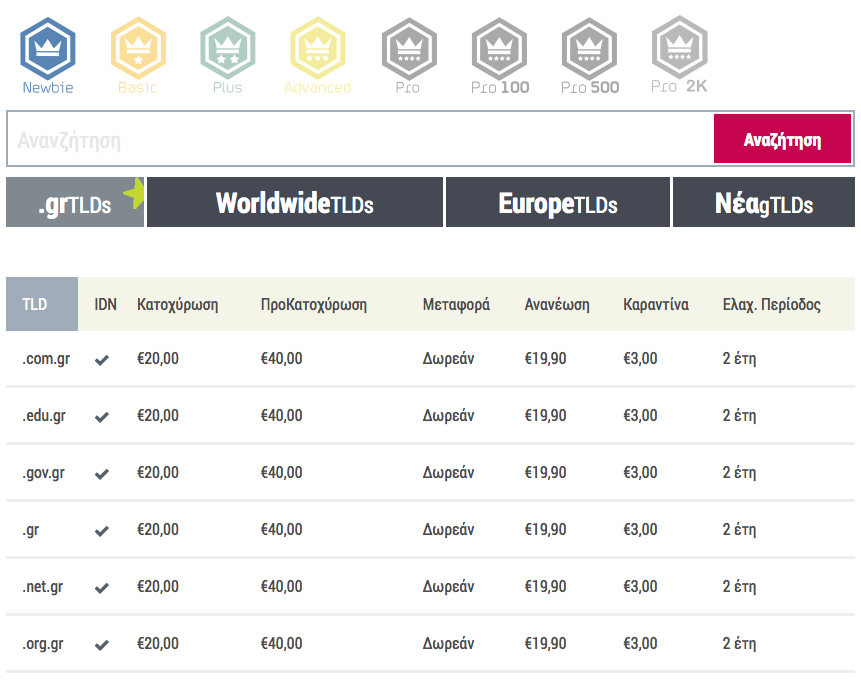
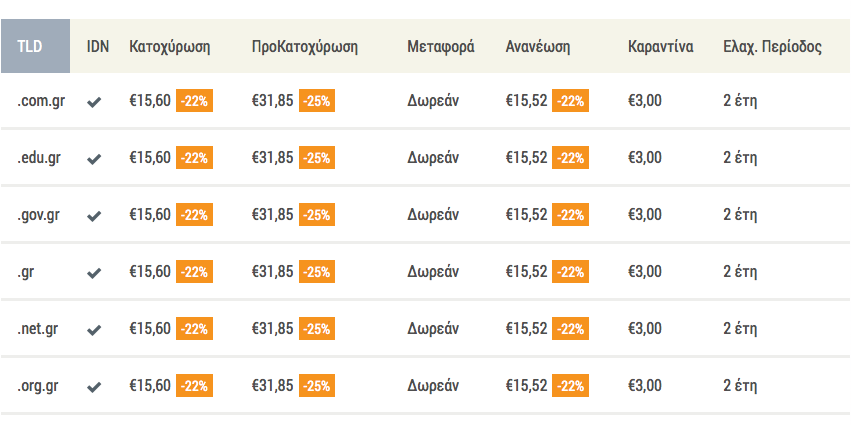
    When you can register more than 900 domain extensions, finding the right price and available services for each one needs to be simple. We built a practical, easy-to-use pricelist inside our easypanel so you can see registration and renewal costs, extra services like backorder (pre-registration), and any registry-imposed limits — all in one place.

    What the price list shows

    Pricing and services at a glance

    The price list includes a column for each important option available per TLD so you know exactly what you can do from the panel. Typical columns include:

    • Registration price
    • Renewal price
    • Backorder / pre-registration availability
    • Domain forwarding
    • Domain privacy
    • Any registry restrictions (eligibility, local presence, etc.)

    If a specific option is not offered or discounts aren’t available for a given state, the table shows anxin that column so you can spot limitations quickly.

    How to use the pricelist

    Sort, filter and search

    Tailor the view to what matters to you: sort by price or TLD name, choose ready-made groups such as.GRorEurope, or search for part of a TLD to find matches fast.

    See available services and registry restrictions

    Besides prices, each row reveals which extra services are available for that TLD and whether the registry sets restrictions — handy when you’re deciding between similar extensions.

    Logged-in prices and discounts

    If you have an easy.gr account, log in and the pricelist automatically updates to show the prices you’ll actually pay — including any discount you have as a Badger. That way you don’t need to switch pages to check your final cost for registration, renewal or pre-registration.

    Quick tip

    Open the interactive pricelist from your account for personalised prices: use the easypanel at https://easy.gr/myeasypanel. For the full public list, visit http://easy.gr/domains/pricelist.

    Where to find the pricelist

    Access it through the easypanel or visit the public pricelist page. The panel is designed to help both casual buyers and domain managers who handle many TLDs across registration, renewal and lifecycle tasks.

    Conclusion

    With over 900 TLDs available, having one consolidated, searchable and filterable pricelist makes domain selection and management far less confusing. It shows not only prices but the services each registry supports and any limitations — and when you sign in, you’ll immediately see your personalised prices and discounts.